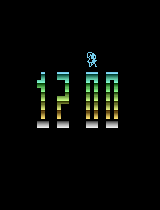
2600 Digital Clock
About This Game
A simple public‑domain digital clock demo for the Atari 2600 that displays the current time using the console’s limited graphics.
Story
This homebrew demo showcases how enthusiasts pushed the Atari 2600’s hardware limits to create a functional digital clock, reflecting the creativity of the public‑domain scene in the late 1990s.
Guide & Tips
Insert the cartridge, power on the console, and the clock will start automatically. Use the joystick to adjust the hour/minute settings if the demo includes a settings mode; otherwise just watch the time tick.
Controls
Use the Atari 2600 joystick: move up/down/left/right to navigate menus (if any); press the single button to confirm selections or start/stop adjustments.
ROM version
4 versionsBackup & Community ROM Sources
If the default ROM fails or you have a working mirror/translation patch, use a verified source below or submit a direct link to help other players.